Digital Tutoring As A Service | SE-673
Project Documentation for a Digital Tutoring Platform as a service
Project maintained by akshayvijaynair Hosted on GitHub Pages — Theme by mattgraham
Project Description
The pandemic demonstrated the potential of using digital services for small businesses. It showed that with the right customization, digital services for local services can be beneficial to their clients.
Take for example freelance teachers/tutors. Specifically focusing on music teaching.
Most music teachers either have their own teaching business or supplement their primary income with teaching services. These businesses usually serve a local area and the services from different teachers tend to be from a broad range of subjects. Some teachers offer music education in more than one instrument, while others are specialists in a specific form of music or musical instrument. Their fees also vary depending on demand, student skill level, and fixed costs.
Some teachers prescribe a syllabus to work from for a structured approach to learning, usually an affiliated board. Students learn music theory, music history along-side their lessons on their instrument of choice. The aforementioned schools also hold routine exams to target completion of curriculum. Performance exams are held with external examiners certified by one of the schools. However, these aren't mandatory. A significant number of students are learning for fun and opt of these set patterns.
The generic product aims to help freelance teachers and students by providing them with a digital interface. Teachers would be able to create a public board advertising their services and have a separate student only space that would cater to their student body. The students should be able to see messages, lesson summaries, recorded classes (if any), and progress reports.
The product should be customizable depending on the services type. Depending on the affiliation, curriculum-based lessons plans should be pre-populated. More broadly, the product should have the ability to group teachers together to create institutions.
Table of Contents
- Project Description
- Features
- Needs and Requirements
- Software Design Document | Use Case Diagram
- Software Design Document | Sequence diagram
- Software Design Document | UML Class Diagram
All drawings in the document can be viewed on draw.io with this link
Features
Needs Elicitation Table | Click to show
| # | Need |
|---|---|
| 1 | A user-friendly interface for teacher profiles. |
| 2 | Customization options for teacher profiles. |
| 3 | Ability to display services offered by teachers. |
- Public site for advertising services.
Needs Elicitation | Click to show
| # | Need |
|---|---|
| 1 | Secure user accounts for students. |
| 2 | Access to lesson summaries and schedules. |
| 3 | Repository for learning materials. |
- Student portal to view lessons, access learning material, scheduling, and history.
Needs Elicitation | Click to show
| # | Need |
|---|---|
| 1 | Social space with user profiles for students. |
| 2 | Ability to upload and share work/performances. |
| 3 | Custom features for interactive sessions. |
- Social space to interact with other students - This would have custom features to upload work/performances/ session.
Needs Elicitation | Click to show
| # | Need |
|---|---|
| 1 | Customizable content upload for teachers. |
| 2 | Content moderation tools. |
| 3 | Grading system for student performances. |
- Ability for teachers to upload content tailored to each student, moderate content, grade performances.
Needs Elicitation | Click to show
| # | Need |
|---|---|
| 1 | Internal messaging system for teachers. |
| 2 | Livestreaming capability for classes. |
- Ability for teachers to broadcast internal messages, livestream classes.
Needs Elicitation | Click to show
| # | Need |
|---|---|
| 1 | Grouping feature for creating institutions. |
| 2 | Administrative controls for grouped teachers. |
- Ability to group teachers together to create larger institutions.
Needs and Requirements
| # | Need | Requirement |
|---|---|---|
| 1 | A user-friendly interface for teacher profiles. | Teachers can create and edit their profiles. |
| 2 | Customization options for teacher profiles. | Support for multimedia content in profiles. |
| 3 | Ability to display services offered by teachers. | Search functionality for students to find teachers. |
| 4 | Secure user accounts for students. | Student registration and account management. |
| 5 | Access to lesson summaries and schedules. | User-friendly dashboard for students. |
| 6 | Repository for learning materials. | Integration with scheduling tools. |
| 7 | Social space with user profiles for students. | Student profile creation for social space. |
| 8 | Ability to upload and share work/performances. | File upload and sharing functionality. |
| 9 | Custom features for interactive sessions. | Interactive features for real-time sessions. |
| 10 | Customizable content upload for teachers. | Teacher-specific content management system. |
| 11 | Content moderation tools. | Moderation tools for uploaded content. |
| 12 | Grading system for student performances. | Grading interface for student performances. |
| 13 | Internal messaging system for teachers. | Secure internal messaging system. |
| 14 | Livestreaming capability for classes. | Integration with livestreaming platforms. |
| 15 | Grouping feature for creating institutions. | Group creation and management functionality. |
| 16 | Administrative controls for grouped teachers. | Access controls and administrative roles. |
Software Design Document | Use Case Diagram
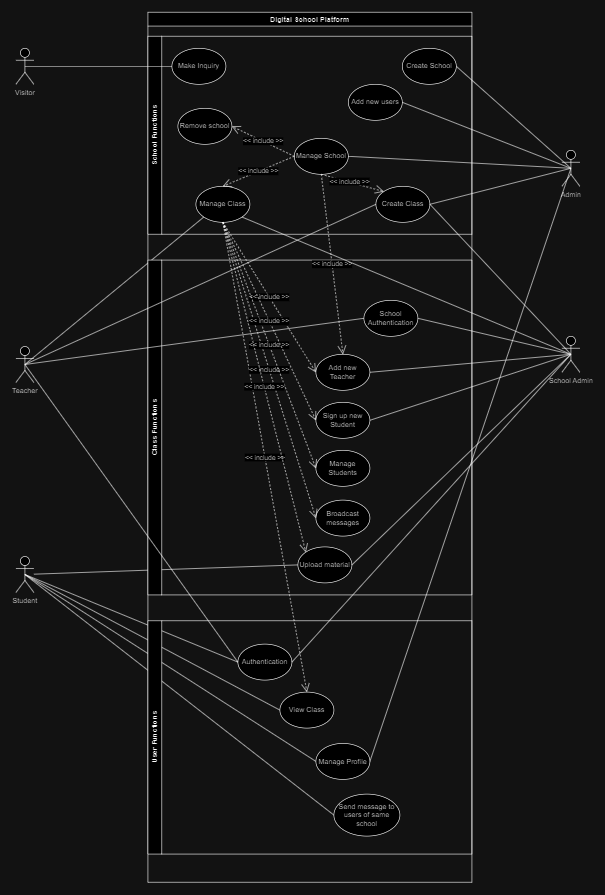
Invite new Users
ID: 1 | Admin sends email invite to join platform
Click here to show use case description
| Description Item | Description |
|---|---|
| Use Case ID | 1 |
| Use Case Description | Admin Sends Email Invite to Join Platform |
| Corresponds to Need and Requirement | 1, 2, 4, 10 |
| Actor | Admin |
| Stakeholders and Needs | Admin - To send email invites to potential users. |
| Pre-conditions | Admin is authenticated and has the necessary privileges. |
| Trigger | Admin initiates the process to send email invites. |
| Post-conditions | Email invites are sent to the specified users. |
| Basic flow | 1. Admin logs into the admin portal. |
| 2. Admin navigates to the user invitation section. | |
| 3. Admin enters the email addresses of users to invite. | |
| 4. Admin includes a personalized message in the invitation. | |
| 5. Admin submits the invitation form. | |
| 6. Authorization Server generates unique invitation tokens. | |
| 7. Email Service sends email invites to the specified users. | |
| Extensions | 2a Admin navigates to the wrong section. |
| 2a1 Admin is redirected to the correct invitation section. | |
| 3a Admin enters an invalid email address. | |
| 3a1 Admin is prompted to correct the email address. | |
| 6a Authorization Server fails to generate invitation tokens. | |
| 6a1 Admin is informed about the failure to send invitations. | |
| 7a Email Service fails to send email invites. | |
| 7a1 Admin is informed about the failure to deliver invites. | |
User authentication
ID: 2 | OAuth2 authentication flow
Click here to show use case description
| Description Item | Description |
|---|---|
| Use Case ID | 2 |
| Use Case Description | OAuth2 authentication flow |
| Corresponds to Need and Requirement | 4 |
| Actor | User |
| Stakeholders and Needs | User - To securely authenticate and access resources. |
| Pre-conditions | User has an account with the Authorization Server. |
| Trigger | User initiates the authentication process with the Client Application. |
| Post-conditions | User is successfully authenticated and receives an access token. |
| Basic flow | 1. User initiates authentication through the Client Application. |
| 2. Client Application redirects the user to the Authorization Server. | |
| 3. User authenticates with the Authorization Server. | |
| 4. Authorization Server validates user credentials. | |
| 5. If valid, Authorization Server issues an authorization code to the Client Application. | |
| 6. Client Application exchanges the authorization code for an access token. | |
| 7. User receives the access token. | |
| Extensions | 3a User denies authentication request. |
| 3a1 Authorization Server redirects user back to the Client Application with an error. | |
| 4a User credentials are invalid. | |
| 4a1 Authorization Server informs the Client Application of the authentication failure. | |
| 6a Authorization code exchange fails. | |
| 6a1 Client Application receives an error response from the Authorization Server. | |
| 6a2 User is informed about the failure to authenticate. | |
Sign up for new Teachers
ID: 3 | OAuth2 User Signup with Email Invite and Profile Setup
Click here to show use case description
| Description Item | Description |
|---|---|
| Use Case ID | 3 |
| Use Case Description | OAuth2 User Signup with Email Invite and Profile Setup |
| Corresponds to Need and Requirement | 1, 2, 4, 10 |
| Actor | User |
| Stakeholders and Needs | User - To securely sign up using an email invite and complete their profile. |
| Admin - To be notified of new user signups. | |
| Pre-conditions | User has received a valid email invite. |
| Trigger | User clicks on the signup link in the email invite. |
| Post-conditions | User successfully signs up, completes the profile, gets redirected to the welcome page, and Admin is notified. |
| Basic flow | 1. User clicks on the signup link in the email invite. |
| 2. User is redirected to the Signup Page. | |
| 3. User enters required information (e.g., name, email, password). | |
| 4. User submits the signup form. | |
| 5. Authorization Server validates user credentials. | |
| 6. If valid, Authorization Server issues an access token. | |
| 7. User is redirected to the Profile Setup Page. | |
| 8. User completes additional profile details. | |
| 9. User submits the profile form. | |
| 10. Resource Server stores the user's profile information. | |
| 11. User is redirected to the Welcome Page. | |
| 12. Admin is notified of the new signup. | |
| Extensions | 3a User abandons the signup process. |
| 3a1 User is redirected to the homepage or login page. | |
| 5a User provides invalid or incomplete information. | |
| 5a1 User is prompted to correct the information. | |
| 9a User abandons the profile setup. | |
| 9a1 User is redirected to the homepage or login page. | |
| 11a Notification to Admin fails. | |
| 11a1 Admin is informed about the failure to notify. | |
Create new public page
ID: 4 | Also known as a public page - This is the landing page for all teachers offering their services
Click here to show use case description
| Description Item | Description |
|---|---|
| Use Case ID | 4 |
| Use Case Description | Also known as a public page - This is the landing page for all teachers offering their services |
| Corresponds to Need and Requirement | 1, 3, 10 |
| Actor | Teacher |
| Stakeholders and Needs | Teacher - to have a digital public space that can be used to advertise services offered |
| Visitor - to discover new teaching services | |
| Pre-conditions | User with "Teacher" role has accessed the platform dashboard |
| Trigger | Teacher clicks on create new public page |
| Post-conditions | Teacher should have an SEO optimized public page offering teaching services in the local area |
| Basic flow | 1. Teacher enters the name of the service |
| 2. Teacher enters services being offered | |
| 3. Teacher enters the area of service offering | |
| 4. Teacher enters prices of services being offered | |
| 5. Teacher selects the color theme of the public page | |
| 6. System generates a preview of the public page | |
| 7. Teacher accepts the preview | |
| 8. Teacher selects the payment plan | |
| 9. Teacher pays the payment plan | |
| 10. Page is publicly available | |
| Extensions | 1a Preview generation fails |
| 1a1 Teacher is notified about the failure and prompted to retry | |
| 2a Invalid input for services being offered | |
| 2a1 Teacher is shown error messages on the input fields | |
| 2a2 Teacher is prompted to correct the service details | |
| 6a Payment fails | |
| 6a1 Teacher receives a notification about the payment failure | |
| 6a2 Teacher is prompted to choose an alternative payment method | |
Create new private page
ID: 5 | Also known as a private page - This is the class service that the teacher is offering to signed up students
Click here to show use case description
| Description Item | Description |
|---|---|
| Use Case ID | 5 |
| Use Case Description | Also known as a private page - This is the class service that the teacher is offering to signed up students |
| Corresponds to Need and Requirement | 4, 5, 6, 9, 10, 11, 12, 13, 14, 15, 16 |
| Actor | Teacher |
| Stakeholders and Needs | Teacher - to have a digital public space that can be used to advertise services offered |
| Visitor - to discover new teaching services | |
| Pre-conditions | User with "Teacher" role has accessed the platform dashboard |
| Trigger | Teacher clicks on create new private page |
| Post-conditions | Teacher should have an SEO optimized public page offering teaching services in the local area |
| Basic flow | 1. Teacher enters the name of the service |
| 2. Teacher enters services being offered | |
| 3. Teacher enters the area of service offering | |
| 4. Teacher uploads starter content of page | |
| 5. Teacher selects the themes of the private page | |
| 6. System generates a preview of the private page | |
| 7. Teacher accepts the preview | |
| 8. Teacher selects the payment plan | |
| 9. Teacher pays the payment plan | |
| 10. Page is published | |
| Extensions | 1a Preview generation fails |
| 1a1 Teacher is notified about the failure and prompted to retry | |
| 2a Invalid input for services being offered | |
| 2a1 Teacher is shown error messages on the input fields | |
| 2a2 Teacher is prompted to correct the service details | |
| 6a Payment fails | |
| 6a1 Teacher receives a notification about the payment failure | |
| 6a2 Teacher is prompted to choose an alternative payment method | |
Manage classes
ID: 6 | Teacher Manages Content, Uploads Grades, Schedules, and Adds New Users
Click here to show use case description
| Description Item | Description |
|---|---|
| Use Case ID | 6 |
| Use Case Description | Teacher Manages Content, Uploads Grades, Schedules, and Adds New Users |
| Corresponds to Need and Requirement | 4, 6, 7 9, 10, 11, 12, 14 |
| Actor | Teacher |
| Stakeholders and Needs | Teacher - To securely manage course content, upload grades, schedule classes, and add new users. |
| Admin - To manage user access and handle new user additions. | |
| Pre-conditions | Teacher is authenticated and has a valid user session. |
| Trigger | Teacher successfully logs in. |
| Post-conditions | Teacher manages content, uploads grades, schedules classes, and adds new users. |
| Basic flow | 1. Teacher logs into the platform using valid credentials. |
| 2. Authorization Server verifies teacher identity. | |
| 3. If valid, Authorization Server issues an access token. | |
| 4. Teacher is redirected to the post-login teacher dashboard. | |
| 5. Teacher manages course content (uploading materials, updating resources). | |
| 6. Teacher uploads grades for students. | |
| 7. Teacher schedules upcoming classes. | |
| 8. Teacher adds new users to the platform. | |
| Extensions | 1a Teacher enters invalid credentials. |
| 1a1 Teacher is prompted to re-enter valid credentials. | |
| 2a Authorization Server fails to verify teacher identity. | |
| 2a1 Teacher is redirected to the login page with an error message. | |
| 5a Teacher encounters an error while managing course content. | |
| 5a1 Teacher is provided with an error message and guidance on how to proceed. | |
| 6a Teacher encounters an issue with uploading grades. | |
| 6a1 Teacher is provided with an error message and guidance on how to resolve the issue. | |
| 7a Teacher faces difficulty scheduling classes. | |
| 7a1 Teacher is provided with assistance and error resolution guidance. | |
| 8a Teacher encounters issues while adding new users. | |
| 8a1 Admin is notified about the issue, and the teacher receives guidance. | |
View class
ID: 7 | Student Accesses Post-Login Page with Hosted Materials
Click here to show use case description
| Description Item | Description |
|---|---|
| Use Case ID | 7 |
| Use Case Description | Student Accesses Post-Login Page with Hosted Materials |
| Corresponds to Need and Requirement | 4, 5, 6, 7 |
| Actor | Student |
| Stakeholders and Needs | Student - To securely access course materials and grades after logging in. |
| Pre-conditions | Student is authenticated and has a valid user session. |
| Trigger | Student successfully logs in. |
| Post-conditions | Student accesses the post-login page with hosted materials like recorded videos and grades. |
| Basic flow | 1. Student logs into the platform using valid credentials. |
| 2. Authorization Server verifies student identity. | |
| 3. If valid, Authorization Server issues an access token. | |
| 4. Student is redirected to the post-login page. | |
| 5. Resource Server provides access to hosted materials (recorded videos, documents, etc.). | |
| 6. Student views recorded videos, course documents, and checks grades. | |
| Extensions | 1a Student enters invalid credentials. |
| 1a1 Student is prompted to re-enter valid credentials. | |
| 2a Authorization Server fails to verify student identity. | |
| 2a1 Student is redirected to the login page with an error message. | |
| 5a Resource Server fails to provide access to materials. | |
| 5a1 Student is informed about the failure to access materials. | |
| 6a Student encounters an error while viewing materials or grades. | |
| 6a1 Student is provided with an error message and guidance on how to proceed. | |
Visitor enquiry
ID: 8 | Visitor Makes an enquiry about a class or school on a public page
Click here to show use case description
| Description Item | Description |
|---|---|
| Use Case ID | 8 |
| Use Case Description | Visitor Makes an enquiry about a class or school on a public page |
| Corresponds to Need and Requirement | 2, 3, 13, 10 |
| Actor | Visitor |
| Stakeholders and Needs | Teacher - To clarify questions from interested parties about the services being offered |
| School admin - to clarify questions from interested parties about school services | |
| Pre-conditions | Visitor has accessed the public page of a teacher or school |
| Trigger | Visitor has submitted an enquiry form from a public page |
| Post-conditions | Enquiry is logged, and public page owners are notified about visitor enquiry |
| Basic flow | 1. Visitor accesses the enquiry form |
| 2. Visitor fills in form details | |
| 3. Visitor submits the form | |
| 4. System logs form details | |
| 5. Public page owner is notified about the message | |
| 6. Visitor is given a success message, and the form is removed from the screen | |
| Extensions | 1a Public page load fails |
| 1a1 Visitor is shown an error page | |
| 2a Form has invalid details | |
| 2a1 Visitor is shown error messages on form elements | |
| 2a2 Visitor is prompted to correct form details | |
| 3a Visitor attempted to submit an incomplete form | |
| 3a1 Submit button is not active | |
| 3a2 Visitor is shown which form fields are required | |
| 6a Form is valid but submission fails | |
| 6a1 Enquiry form submission error is returned to Visitor | |
| 6a2 Visitor is shown an appropriate error |
Software Design Document | Sequence diagram
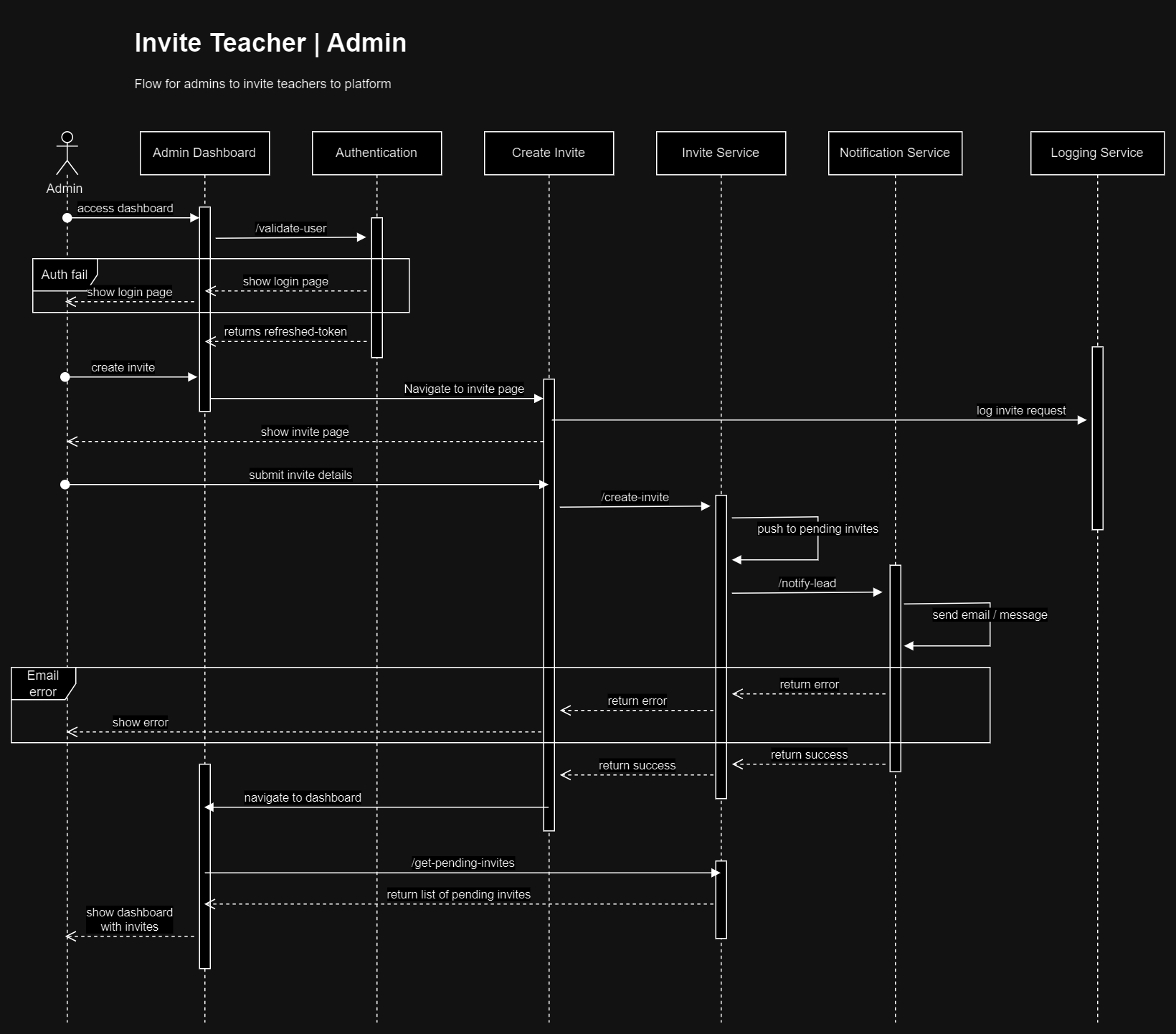
Invitation flow
This flow is the starting point for most teachers. Admins would create invites for new teachers to sign up to the platform. They would also act as relationship managers to invitees that accept
Invitation Flow
Click here to show sequence diagram
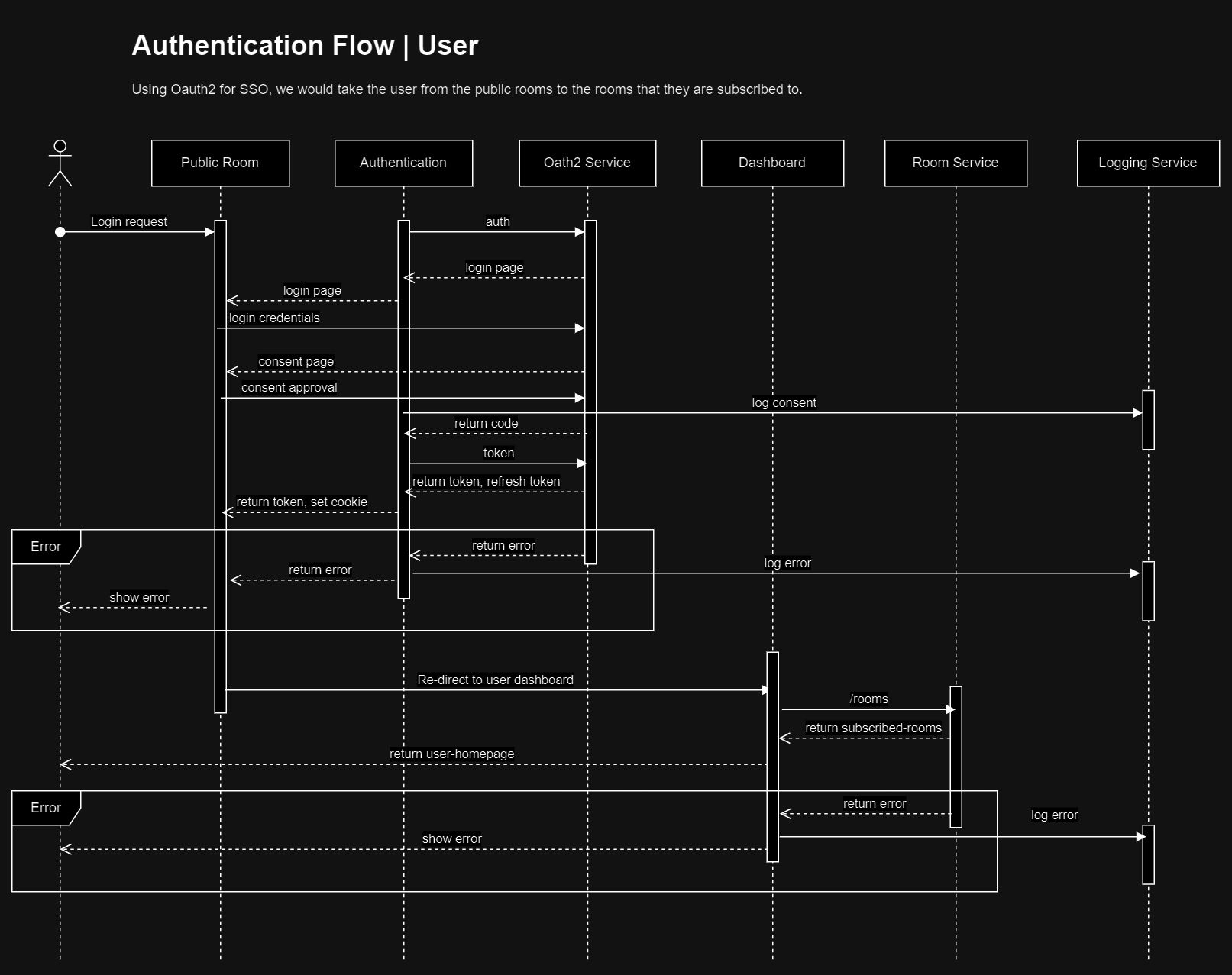
Authentication flow
This is the most common authentication flow for all user roles on the platform. Using OAuth2 as a authentication platform, we can make do without some of the usual login processes for expediency
Authentication Flow
Click here to show sequence diagram
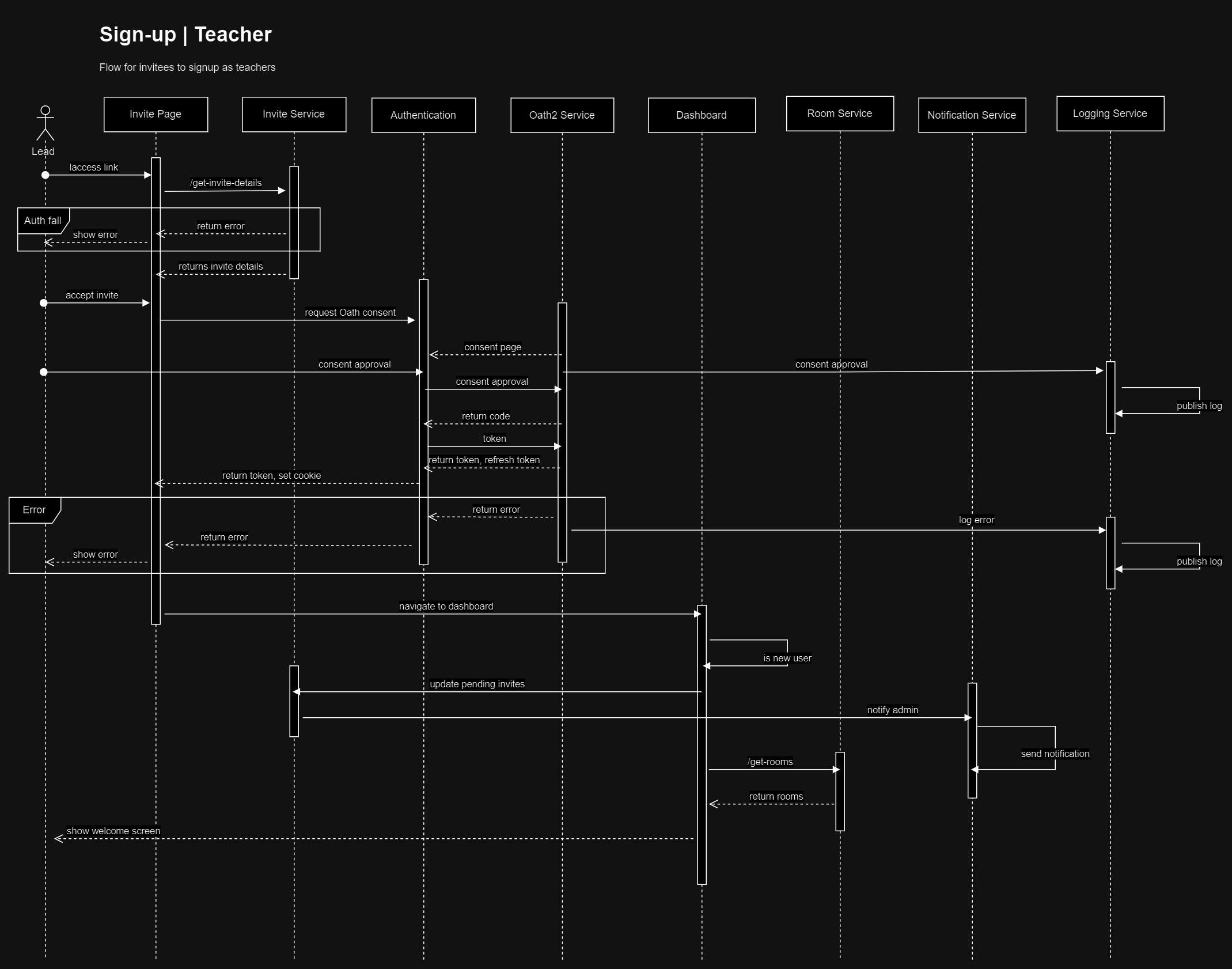
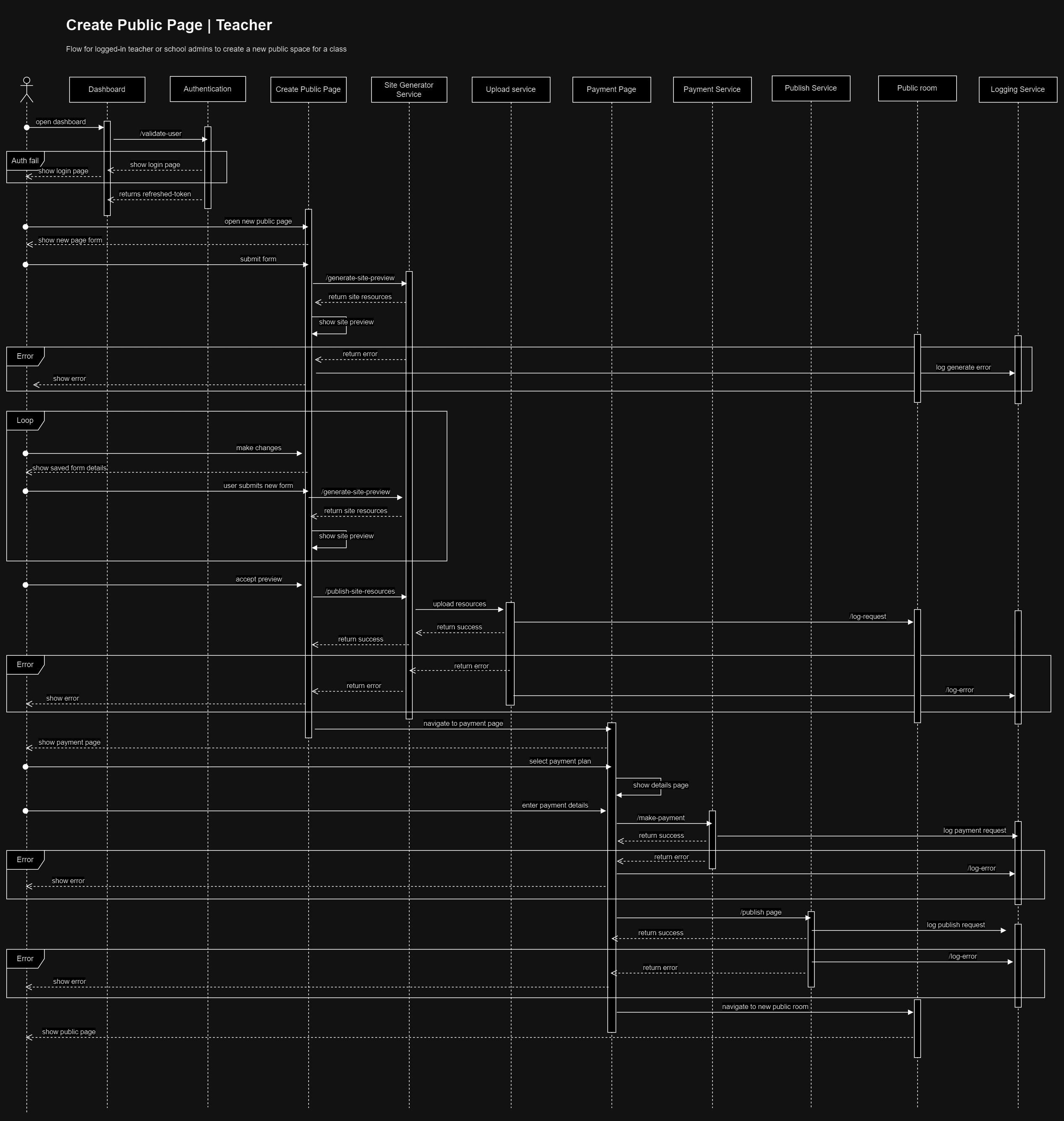
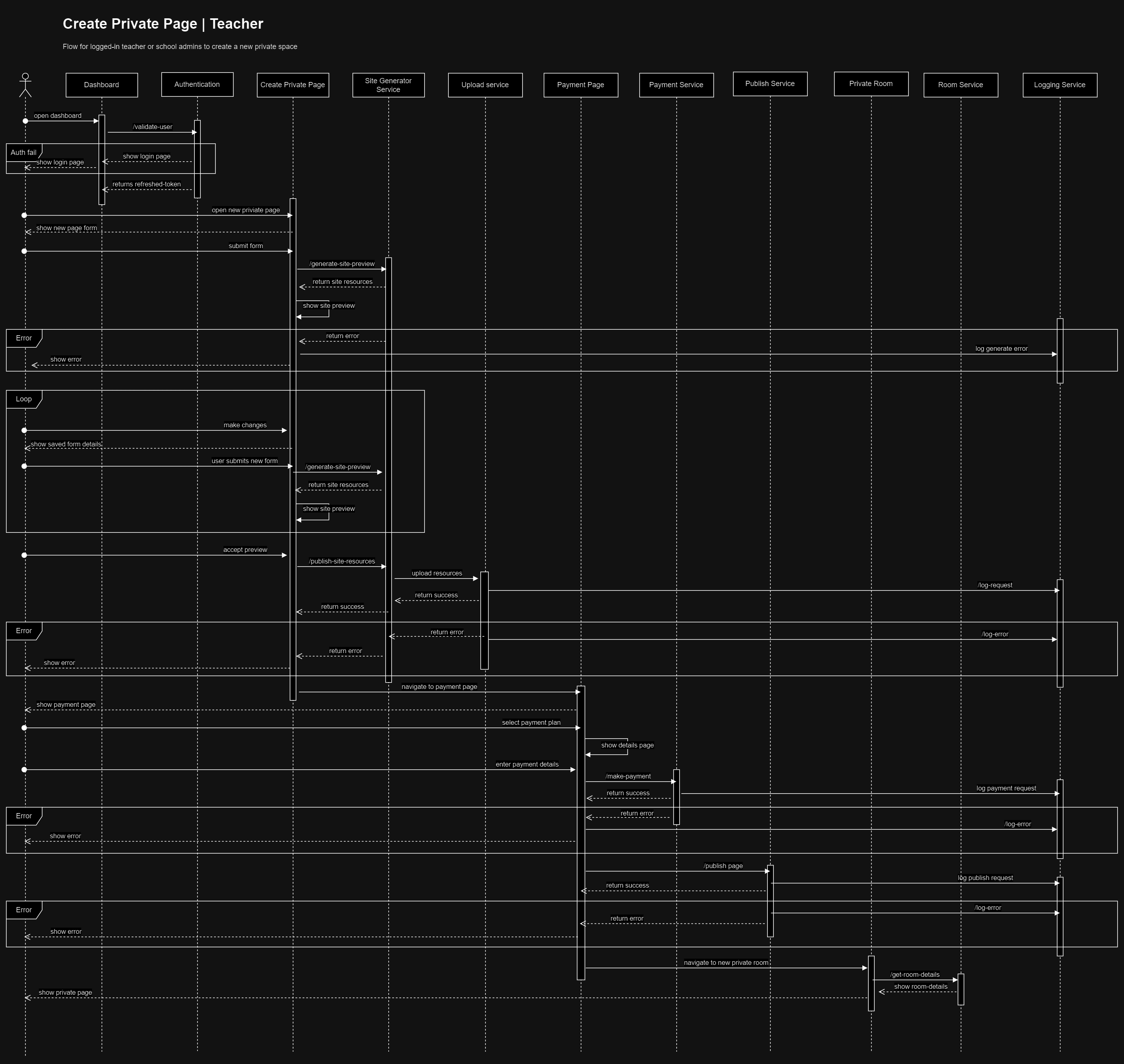
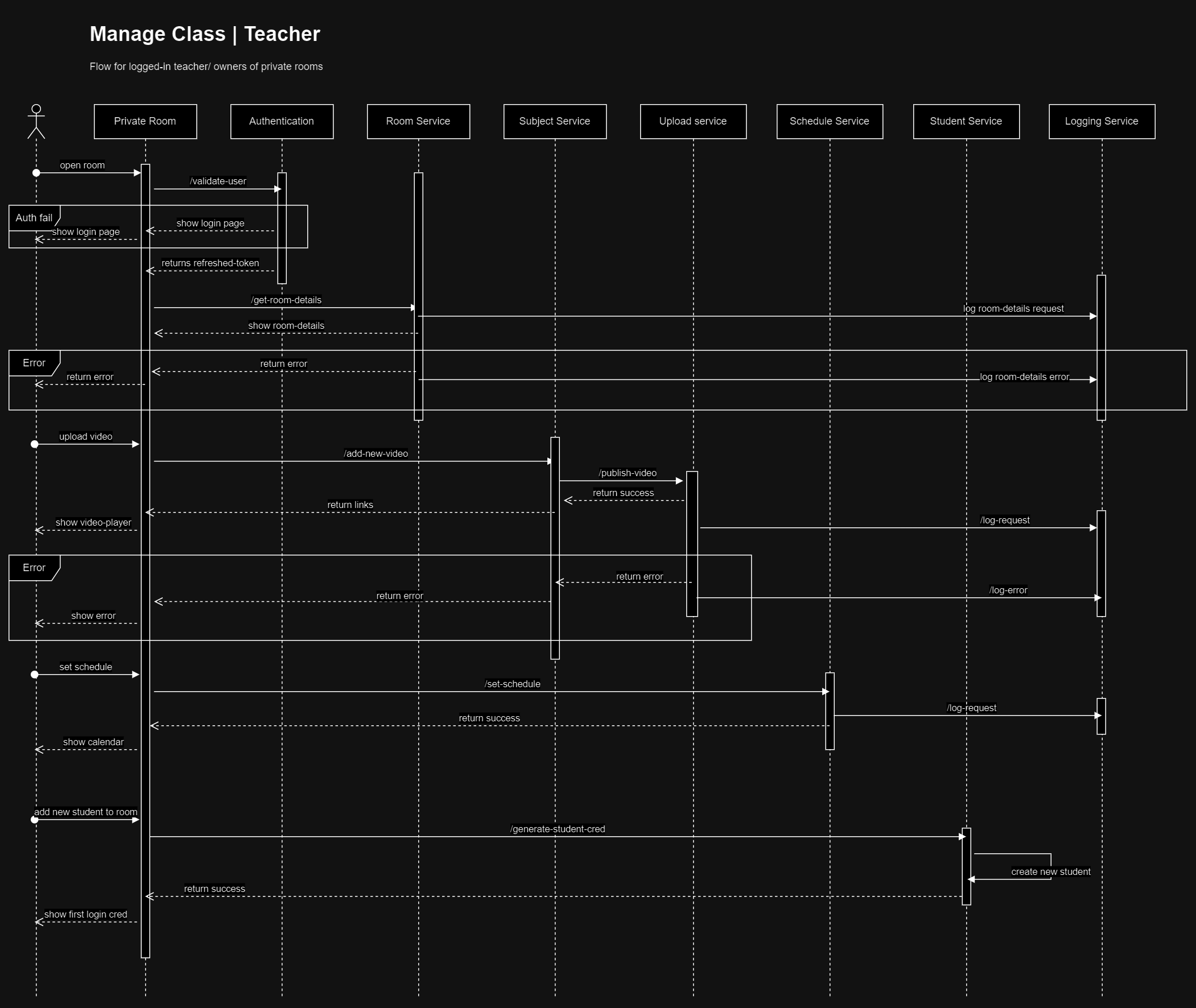
Teacher flow
Teachers will be able to create their own public pages, add in relevant content. They will also be able to create private rooms that is linked to each public room. This would be the student pages that would host the learning content
Sign up
Click here to show sequence diagram
Create Public Room Flow
Click here to show sequence diagram
Create Private Room Flow
Click here to show sequence diagram
Manage Private Room Flow
Click here to show sequence diagram
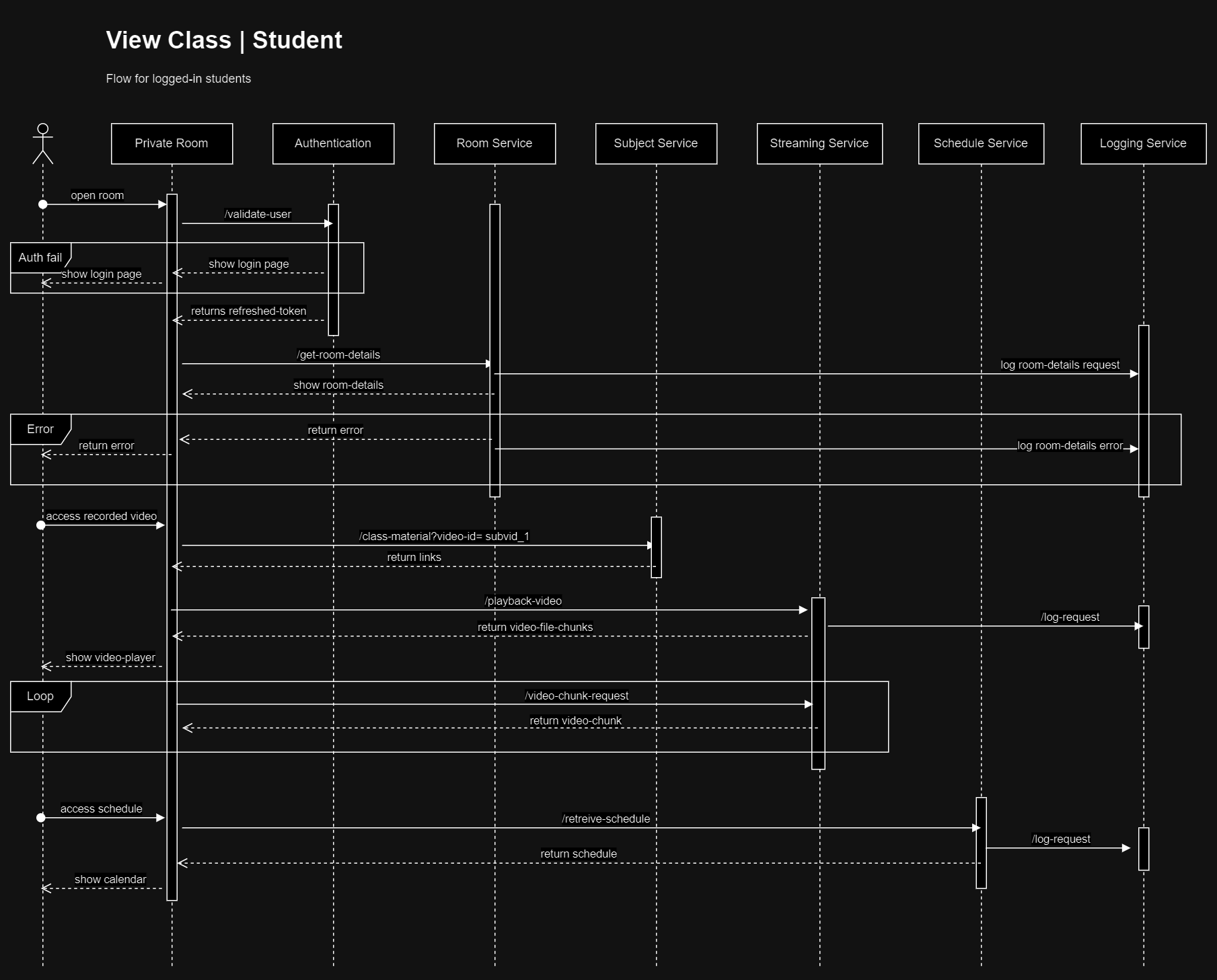
Student flow
Students will access private rooms with credentials provided by linked public room owners. There-fore each public room will have different login credentials.
Student flow to view classes
Click here to show sequence diagram
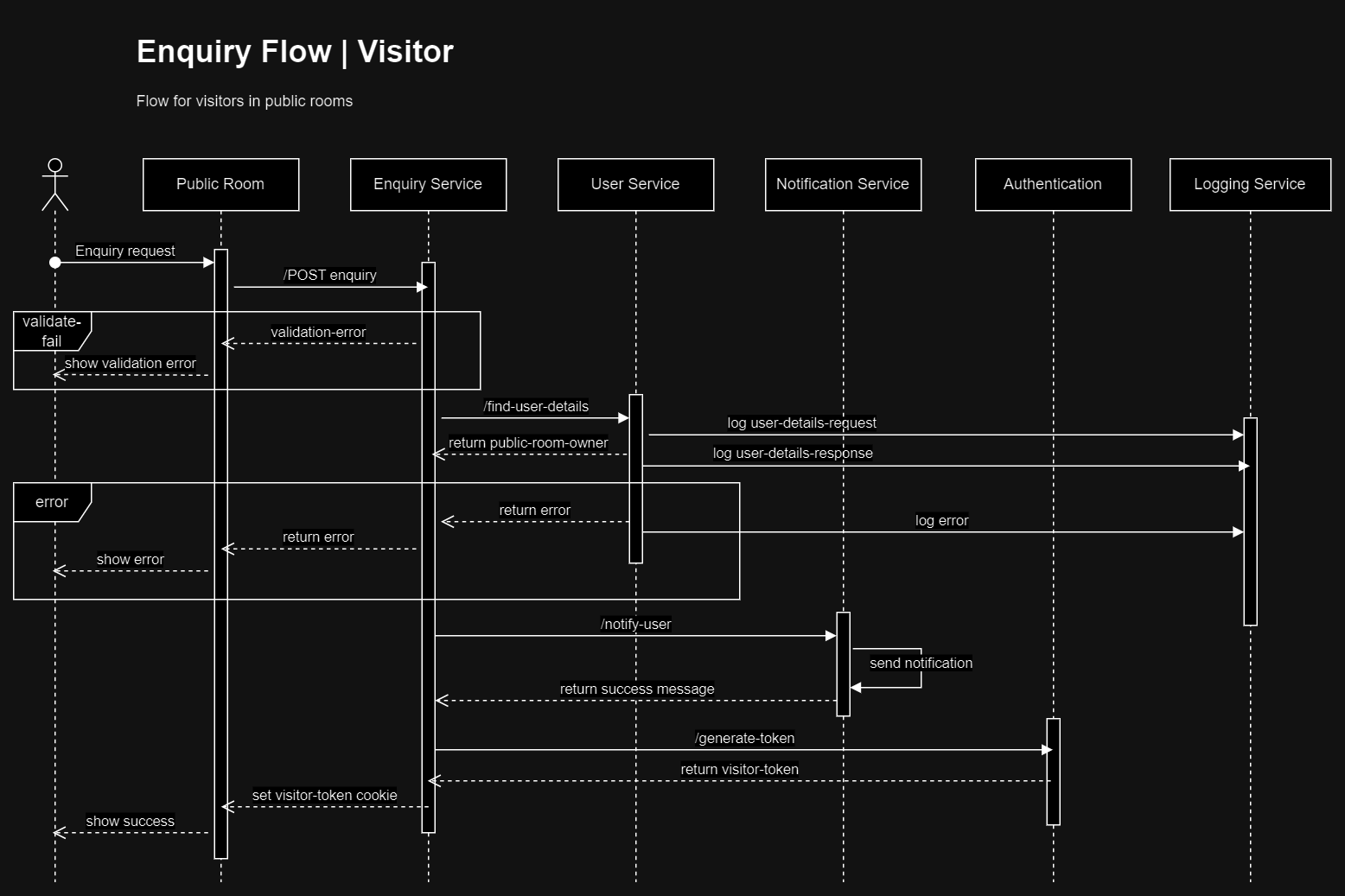
Visitor flow
Enquiry flow for visitors
Click here to show sequence diagram
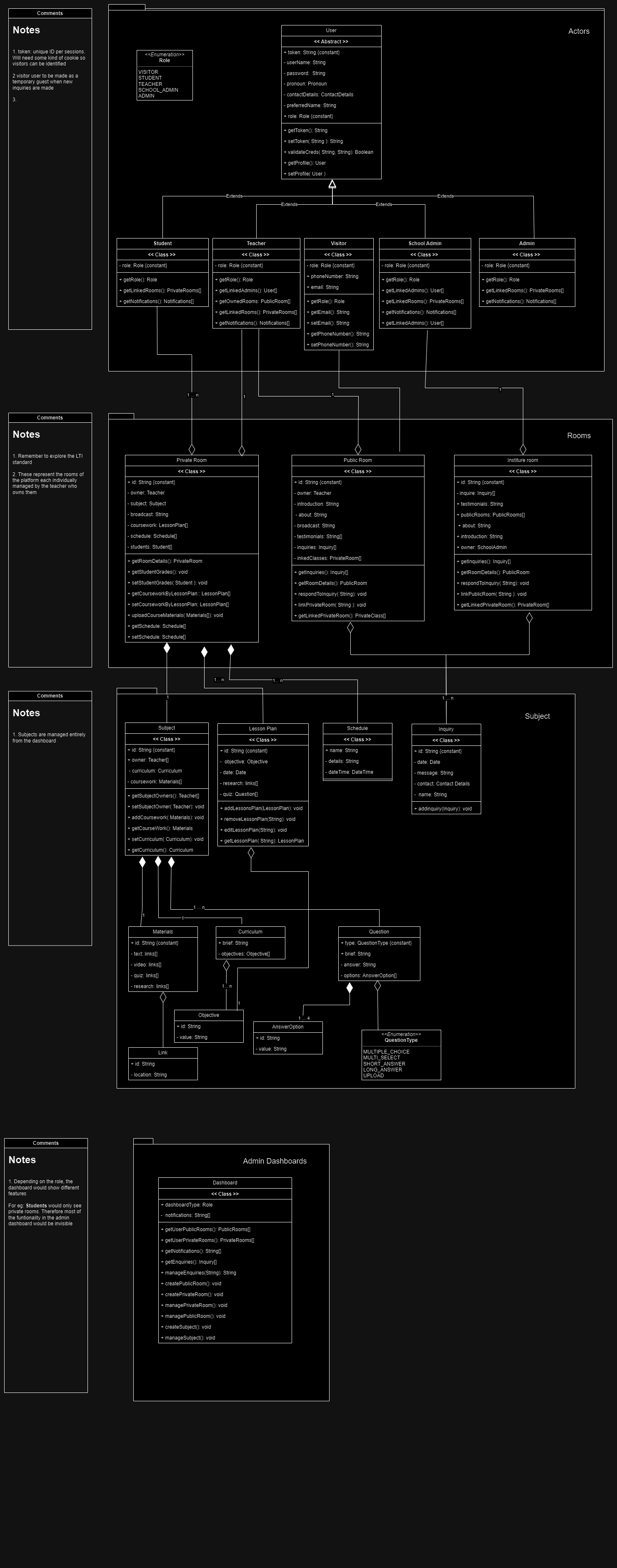
Software Design Document | UML Class Diagram